> ## Documentation Index
> Fetch the complete documentation index at: https://docs.fizen.io/llms.txt
> Use this file to discover all available pages before exploring further.
# How to Buy an eSIM
> Buy a Fizen eSIM with USDT or card, and activate it in one click.
**Buy before you fly.** Install your eSIM shortly before departure on trusted Wi-Fi, so you're connected the moment you land. If your regional/global plan also covers the country you're in now, install it but keep the line **off** until you arrive — connecting early can start the plan's validity.
## Purchase
**Check your phone first.** Use the device check in the app's eSIM section, or dial `*#06#` to see if you have an EID. It matters: an eSIM you haven't installed can still be returned, but once installed it can't. See [Supported Devices](/help-center/fizen-esim/supported-devices).
Go to the home screen and tap **eSIM**.
Type the country name. You'll see available data plans with pricing. Regional plans cover multiple countries in one package.
Pick based on data amount, validity period, and coverage area.
Pay with **USDT** straight from your wallet balance, or pick a fiat method at checkout: **Card (Visa/Mastercard)** or **Apple Pay / Google Pay** for fast checkout with the cards already saved on your phone. Confirm, and you're done.
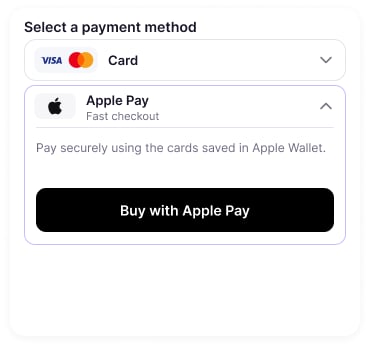 Paying by card for the first time? Enter the details once and toggle **Save card for future purchases** — after that it's one tap:
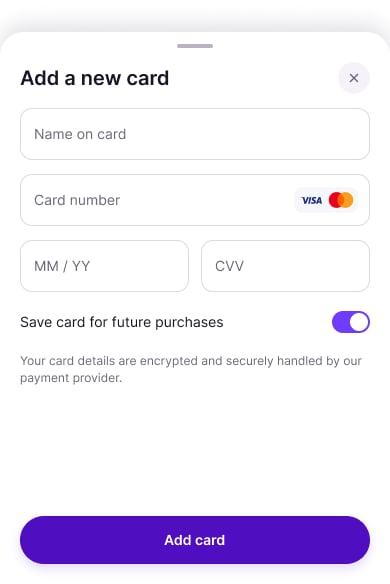 Card details are encrypted and handled by our payment provider (Stripe). Fizen never stores your card number.
***
## Activate in one click
**No QR codes. No manual setup.** After purchase, you receive an activation link — tap it once and your eSIM installs itself.
Right after purchase, you'll get the link via in-app notification and email. Open it on the phone you want the eSIM on.
Your phone asks to add the eSIM — tap **Allow / Add**. That's it, the eSIM is installed.
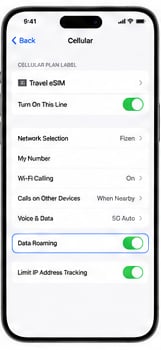
When you land, enable **Data Roaming** for your eSIM line in **Settings → Cellular/Mobile**.
Card details are encrypted and handled by our payment provider (Stripe). Fizen never stores your card number.
***
## Activate in one click
**No QR codes. No manual setup.** After purchase, you receive an activation link — tap it once and your eSIM installs itself.
Right after purchase, you'll get the link via in-app notification and email. Open it on the phone you want the eSIM on.
Your phone asks to add the eSIM — tap **Allow / Add**. That's it, the eSIM is installed.
When you land, enable **Data Roaming** for your eSIM line in **Settings → Cellular/Mobile**.
 Most eSIMs activate within 1–2 minutes. Some destinations may take up to 10 minutes.
***
## Manual installation (optional)
Installing the eSIM on a different phone than the one you bought it on, or prefer QR / activation-code entry? Follow the step-by-step guide for your phone brand:
iOS, Samsung, Pixel, Xiaomi, Oppo, Vivo, Honor, Huawei & more
## Keep reading
* [How to buy a travel eSIM with crypto (USDT)](https://blog.fizen.io/buy-esim-with-crypto-usdt-2026/)
* [Get \$10 eSIM welcome credit in the app](/help-center/fizen-esim/welcome-credit)
* [Compare plans and prices on fizen.io](https://fizen.io/esim/pricing)
Most eSIMs activate within 1–2 minutes. Some destinations may take up to 10 minutes.
***
## Manual installation (optional)
Installing the eSIM on a different phone than the one you bought it on, or prefer QR / activation-code entry? Follow the step-by-step guide for your phone brand:
iOS, Samsung, Pixel, Xiaomi, Oppo, Vivo, Honor, Huawei & more
## Keep reading
* [How to buy a travel eSIM with crypto (USDT)](https://blog.fizen.io/buy-esim-with-crypto-usdt-2026/)
* [Get \$10 eSIM welcome credit in the app](/help-center/fizen-esim/welcome-credit)
* [Compare plans and prices on fizen.io](https://fizen.io/esim/pricing)