> ## Documentation Index
> Fetch the complete documentation index at: https://docs.fizen.io/llms.txt
> Use this file to discover all available pages before exploring further.
# Troubleshooting
> eSIM installed but no internet? Work through this 2-minute checklist.
Most connection issues come down to one of five settings. Work through them in order — each takes seconds.
**Don't delete the eSIM**, no matter what. A deleted eSIM can't be reinstalled, but a "not working" one can almost always be fixed in chat.
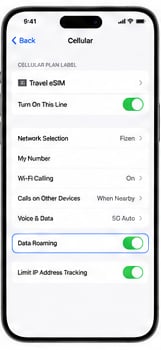
**Settings → Cellular/Mobile → your eSIM line → Data Roaming → ON.** This is the #1 cause of "no internet" — travel eSIMs need roaming enabled to connect.
 In **Settings → Cellular/Mobile → Mobile Data**, make sure your **Fizen eSIM** is selected — not your home SIM.
Turn Airplane Mode on, wait 30 seconds, turn it off. This forces your phone to re-register on the local network. A full restart works too.
In **Settings → Cellular/Mobile → your eSIM line → Network Selection**, switch off **Automatic** and pick a supported carrier from the list. If one carrier fails, try another.
Open **Fizen App → eSIM → My eSIMs** to confirm your plan is active and has data left. If the plan is used up, buy a new plan in a few taps (it comes as a new eSIM to install). See [Check Your Data Balance](/help-center/fizen-esim/check-data-balance).
***
## Still not connected?
Tap the chat icon in the Fizen App. A human agent will assist you as soon as possible — and if the fault is on our side, replace your eSIM free of charge or refund you under the guarantee.
## Keep reading
* [Which phones support eSIM: the complete list](https://blog.fizen.io/which-phones-support-esim-in-2026-the-complete-compatibility-list/)
* [eSIM scams in 2026 and how to stay safe](https://blog.fizen.io/esim-scams-how-to-avoid-2026/)
* [Get a Fizen eSIM on fizen.io](https://fizen.io/esim)
In **Settings → Cellular/Mobile → Mobile Data**, make sure your **Fizen eSIM** is selected — not your home SIM.
Turn Airplane Mode on, wait 30 seconds, turn it off. This forces your phone to re-register on the local network. A full restart works too.
In **Settings → Cellular/Mobile → your eSIM line → Network Selection**, switch off **Automatic** and pick a supported carrier from the list. If one carrier fails, try another.
Open **Fizen App → eSIM → My eSIMs** to confirm your plan is active and has data left. If the plan is used up, buy a new plan in a few taps (it comes as a new eSIM to install). See [Check Your Data Balance](/help-center/fizen-esim/check-data-balance).
***
## Still not connected?
Tap the chat icon in the Fizen App. A human agent will assist you as soon as possible — and if the fault is on our side, replace your eSIM free of charge or refund you under the guarantee.
## Keep reading
* [Which phones support eSIM: the complete list](https://blog.fizen.io/which-phones-support-esim-in-2026-the-complete-compatibility-list/)
* [eSIM scams in 2026 and how to stay safe](https://blog.fizen.io/esim-scams-how-to-avoid-2026/)
* [Get a Fizen eSIM on fizen.io](https://fizen.io/esim)